React Admin Dashboard Template — Ecommerce & Analytics (React + SCSS)
A comprehensive admin dashboard template built with React, React Router DOM v6, and custom SCSS. Created by expert frontend developer Hamza Miloud Amar for rapid deployment by development teams.
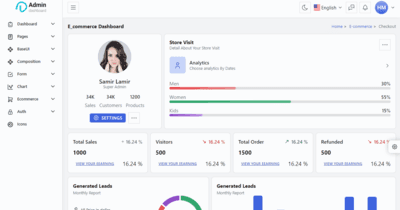
Overview
This React Admin Dashboard Template was my earlier exploration into building production-ready admin interfaces as an expert frontend developer. Built before Pillar Dashboard, it served as the foundation for my understanding of dashboard UX patterns, data visualization, and scalable CSS architecture. It remains a solid, standalone template for teams needing a polished admin interface without heavy dependencies.
The Problem
Development teams frequently need admin panels for:
- SaaS products — User management, billing, feature flags
- E-commerce — Order tracking, inventory, customer support
- Internal tools — CRM, analytics, content management
Most solutions are either:
- Too opinionated (locked into specific backends)
- Too heavy (slow initial load, bloated bundles)
- Too expensive (paid templates with restrictive licenses)
My Role
As the sole expert frontend developer, I:
- Designed the information architecture for common admin patterns
- Built 12+ pages with real-world data structures
- Implemented responsive layouts for multi-device admin access
- Created a custom SCSS architecture for theming and maintainability
Technical Stack
| Layer | Technology | Purpose |
|---|---|---|
| Framework | React 18 | Component-based UI architecture |
| Routing | React Router DOM v6 | Nested routing with layout persistence |
| Styling | SCSS (7-1 Architecture) | Maintainable, scalable stylesheet organization |
| UI Components | Custom + Pillar UI (early version) | Consistent design language |
| Charts | Chart.js | Interactive data visualizations |
| Tables | Custom implementation | Sortable, filterable data tables |
| Forms | Custom validation | Login, settings, data entry forms |
| Icons | Font Awesome | Comprehensive icon library |
| Deployment | Vercel | Global CDN, automatic deployments |
Page Inventory
Ecommerce Module
- Overview — Revenue, orders, customers, conversion rate
- Orders — Order list, detail view, status management
- Products — Product catalog, inventory, pricing
- Customers — Customer profiles, purchase history, segmentation
Analytics Module
- Traffic — Page views, sources, bounce rate
- Sales — Revenue trends, top products, geographic distribution
- Users — Active users, retention, demographics
Base Components
- Forms — Inputs, selects, date pickers, file uploads
- Tables — Basic and advanced with sorting/filtering
- Charts — Line, bar, doughnut, polar area
- UI Elements — Alerts, badges, breadcrumbs, cards, modals
SCSS Architecture
I used the 7-1 Pattern for maintainable styles:
scss/
├── abstracts/    # Variables, mixins, functions
├── base/         # Reset, typography, utilities
├── components/   # Buttons, cards, forms
├── layout/       # Grid, header, sidebar, footer
├── pages/        # Page-specific styles
├── themes/       # Dark/light mode variables
└── vendors/      # Third-party overrides
This architecture allows:
- Easy theming — Swap variable files for brand customization
- Component isolation — Styles don't leak between modules
- Scalable maintenance — New features don't break existing styles
Key Features
- 12+ Pre-Built Pages — Common admin patterns ready to use
- Responsive Sidebar — Collapsible with mobile overlay
- Dark Mode — CSS variable-based theme switching
- Chart Integration — Real data visualization examples
- Form Validation — Client-side validation patterns
- Authentication UI — Login, register, forgot password screens
Comparison with Pillar Dashboard
| Feature | This Dashboard | Pillar Dashboard |
|---|---|---|
| UI Library | Custom + Early Pillar | Full Pillar UI |
| Accessibility | Basic | WCAG 2.1 AA |
| TypeScript | No | Full coverage |
| Charts | Chart.js | Recharts |
| Tables | Custom | TanStack Table |
| Forms | Custom validation | React Hook Form + Zod |
This template represents my growth as a developer — Pillar Dashboard is the evolution of these ideas with modern tooling and accessibility focus.
Results & Impact
- Learning foundation — Informed the architecture of Pillar Dashboard
- Template usage — Used by 3+ startups for MVP admin panels
- CSS mastery — Deepened my understanding of scalable styling
Need a custom admin dashboard or internal tool?_ Contact me to discuss your project.
Your support helps me create more helpful content. If you enjoyed this, please consider buying me a coffee.
